




Blog / Car Buying Tips

Can I Trade In My Truck If I Still Owe On It?

Business professional shaking hands with client during a meeting

Short answer: yes. Dealerships handle this situation every day, and it doesn't require you to pay off your loan before you walk onto the lot. If you're weighing your options, our team at Monument Chevrolet in Pasadena, TX can pull your payoff details and walk you through the numbers, or you can contact our team to get started.

Yes, You Can Trade In a Truck You Still Owe On

Trading in a financed vehicle is possible even when there's an outstanding balance sitting on the loan. Most dealerships are set up to handle exactly this kind of transaction, and they deal with it constantly. The process does involve a few extra steps compared to trading in a truck you own outright, since your current lender needs to be paid off as part of the deal. The dealership just needs a bit more information from you upfront, namely your loan details and current payoff figure, and the sale moves forward from there.

Understanding Your Loan Payoff and Equity

Before you trade in a car you still owe money on, it helps to understand two terms: payoff amount and equity. Your payoff amount is what your lender says you'd need to pay to fully satisfy the loan as of a specific date. Trade-in equity is simpler than it sounds: it's the difference between what your truck is worth and what you still owe. The formula is straightforward. Equity equals your truck's current trade-in value minus your remaining loan payoff. That one calculation determines which of two very different situations you're in.

Positive Equity: Your Truck Is Worth More Than You Owe

Positive equity means your truck's trade-in value is higher than what you owe on the loan, and that difference becomes equity you can apply toward your next vehicle. In practice, the dealership pays off your existing loan using part of the trade-in value, and whatever's left over gets credited toward your new purchase, similar to a down payment. This is the scenario every buyer hopes for, since it directly reduces what you'll need to finance on your next truck. Worth checking your loan documents first: some lenders charge a prepayment penalty for paying off early, which comes out of that equity.

Negative Equity: You Owe More Than It's Worth

Negative equity, often called being upside-down, is the opposite situation. Your payoff exceeds what the truck is actually worth on trade. When this happens, there's no leftover credit to apply toward a new vehicle. That shortfall has to be addressed somehow: paying the difference in cash, rolling it into your new loan, or working out another arrangement with the dealership. The deal still goes through when you owe more than the car's worth, but it changes the math on your new loan.

How the Trade-In Payoff Process Works at a Dealership

At our Pasadena dealership, the process starts with an appraisal of your truck to determine its current trade-in value. From there, we work with your lender to confirm an official payoff amount. The payoff figure your lender provides can be higher than the balance shown on your last statement, because of how interest is calculated and because any outstanding late fees or other charges get added in. That's why dealers typically request a payoff quote good through a specific date, commonly ten days out, so the number holds while the paperwork is finalized.

Once we have that number, the trade-in value gets applied against the loan balance. Any leftover equity rolls into your new purchase, while a gap gets folded into your new financing instead. Either way, we send the payoff funds directly to your lender, who then releases the lien on the vehicle. Keep making your regular payments on the old loan until your lender confirms the payoff has been received and processed. Skipping payments during this window can create unnecessary complications.

Rolling Negative Equity Into a New Loan

If you're upside-down, one common path is rolling that negative equity into your new loan. It's a real option, and a legal one when the dealer discloses it clearly. What the FTC does prohibit is a dealer telling a customer they're paying off the negative equity themselves while actually folding it into the new loan. Done transparently, rolling negative equity simply means your new loan amount includes both the price of your new truck and the leftover balance from your old one. Some dealers also cover it by reducing your down payment credit rather than adding to the loan, so check both lines on the contract.

That said, this approach increases the total amount you're financing, which means more interest paid over the life of the loan and a bigger monthly payment at the same rate and term. Stretching the term brings the payment back down, but the FTC recommends the shortest term you can afford when negative equity is rolled in, since a longer loan means more interest and a longer wait before you're back in positive equity. It's workable in many cases, but it's generally not the first choice if you have alternatives. If you want to see exactly how rolling over negative equity would affect your specific numbers, get pre-approved or contact our team and we can walk through different scenarios with you before you commit to anything.

Pros of Trading In a Financed Truck

Trading in a financed car offers a few clear advantages over other routes. The dealership handles the paperwork, coordinates with your lender on the payoff, and manages the title transfer, so you're not stuck chasing down documents on your own. It's also quicker than selling privately, since you're not waiting on buyers to respond or arranging test drives.

The tax advantage is real and it's worth knowing in Texas specifically: motor vehicle sales tax is 6.25 percent of the sales price minus the trade-in allowance, so trading in a $15,000 truck against a $50,000 purchase means you're taxed on $35,000. Better still for anyone upside-down, Texas bases that allowance on the vehicle's value, not your equity in it, so a loan balance doesn't reduce the deduction.

Cons and Risks to Consider

Trading in a financed truck isn't without downsides. Dealership trade-in offers typically net less than what you could get selling the same vehicle privately, since dealers need to resell the vehicle at a profit. If you're carrying negative equity and choose to roll it into your new loan, you're signing up for more interest paid over time and a higher payment unless you extend the term. It can also set you up to be upside-down again sooner on the new loan, making your next trade-in trickier down the road.

Trading in a vehicle with a loan balance isn't always the best move, since any shortfall left after your trade-in value is applied has to go somewhere, usually into your new car's financing. That only applies if you're upside-down. With positive equity, the loan gets paid off in full and the remainder works in your favor. Some buyers carrying negative equity will still choose to trade anyway for the convenience, the timing, or simply the need to get out of their current truck.

Steps to Trade In Your Financed Truck

Getting out of a car loan with negative equity, or trading in one with positive equity, follows a similar process either way. Here's how to trade in a truck you owe money on, step by step.

Get Your Payoff Quote and Trade-In Valuation

Start by requesting a payoff quote from your lender, ideally a 10-day quote so it accounts for accrued interest through a specific date. At the same time, get a trade-in valuation using a reputable pricing guide like Kelley Blue Book or Edmunds, or better yet, bring your truck in for an in-person appraisal. Comparing these two figures tells you immediately whether you're sitting on positive or negative equity, which shapes every decision that follows.

Gather Paperwork and Compare Offers

Once you know where you stand, pull together your paperwork. You'll typically need your title or payoff letter, driver's license, current registration, proof of insurance, and your lender's name, account number, payoff amount, and contact information. It's also smart to request written documentation from any dealership showing your trade value, new vehicle price, and financing terms as separate line items. That transparency helps you see exactly what's happening with your old loan balance instead of it disappearing into one lump number.

Trade-In vs. Selling Privately With a Loan Balance

Selling a car with a loan to a private party can potentially put more money in your pocket than a trade-in would, since you're not giving the dealer room for resale margin. But selling a financed car privately takes real effort. You have to find a buyer, coordinate with your lender to handle the lien release, and manage all the paperwork yourself. It's more involved than trading it in, even though it's absolutely doable.

A trade-in, by comparison, is faster and simpler because the dealership deals directly with your lender on the payoff. Either path you choose, the existing loan balance has to get settled one way or another. It really comes down to whether you value the extra time and effort a private sale requires against the convenience of a trade-in. This is also where working with an experienced finance team makes a real difference. Unlike a private buyer or an online car-buying service, our team can pull your exact payoff details directly and walk you through equity or rollover scenarios face to face, so you're not guessing at numbers.

Ready to Trade In or Sell Your Truck? Visit Monument Chevrolet in Pasadena

You don't need your truck paid off before you trade it in, and the process is more manageable than most people expect. As a family-owned dealership serving Pasadena, TX and the Greater Houston area for more than 50 years, Monument Chevrolet has helped generations of local drivers work through exactly this situation. Our finance team can pull your payoff amount, appraise your truck, and lay out your equity position clearly, whether that means putting positive equity toward your next Chevrolet or figuring out the best path forward with negative equity.

Start the Process Today

If you're ready to see what your truck is worth, browse new trucks or browse used trucks to get a sense of your next vehicle, then get pre-approved or contact our team to talk through your specific payoff and equity situation before you decide anything. We're here to make the process straightforward, no matter what's driving your next move.

Posted in:

Recommended Posts

Wildcat Golf Club

Golf Lessons for Kids in Houston, TX

Houston parents looking to get their kids off the couch and onto the fairway have plenty of solid options nearby. Municipal courses run junior tournaments, and nonprofit programs build entire curriculums around character development. Between those two poles sits a range of golf lessons for kids in Houston, TX that fit different ages, budgets, and skill levels. Whether you're searching for golf for 3 year olds near me or a more structured junior golf academy for a teenager, this guide breaks down five well-known programs and what to expect from each. Why Golf Lessons Are a Great Activity for Houston Kids Kids' golf builds physical stamina and mental discipline while also teaching them how to get along with others on the course. Walking and carrying clubs for 18 holes can burn up to 1,500 calories, and the swing itself demands real explosive power, so the workout is more intense than it looks from the sidelines. The sport also seems to build resilience. Kids learn to manage frustration after a bad shot and stay patient through a slow round, and that kind of focus over long stretches carries over into other parts of life. Concentration and emotional regulation built on the course tend to show up in the classroom too. Some youth development experts have noted that early exposure to golf teaches foundational life principles, and that kids who start young often build stronger relationships and more empathy and discipline. Prominent figures in the sport have made similar points about golf helping kids grow up faster and learn how to behave. Research on school sport involvement in adolescence has found it predicts lower depression and stress along with higher self-rated mental health in young adulthood. Houston's warm climate means kids can practice and take lessons nearly year-round, which makes it a lot easier to stick with the sport long enough to see these benefits. Top Places for Kids' Golf Lessons in Houston Houston has no shortage of junior golf clinic options, but the five programs below stand out for their structure, credentials, or accessibility. The right fit depends on your child's age, experience level, and how far you're willing to drive. All five are manageable drives from Pasadena, so building a lesson schedule doesn't turn into an all-day commitment. Golf Club of Houston Golf Club of Houston runs a Junior Academy that follows the US Kids Program guidelines, so instruction scales with a child's age instead of treating every kid the same. Weekly after-school clinics and weekend sessions cover the full swing, short game, and rules and etiquette. Instructors carry PGA credentials, and one uses Trackman and BodiTrak technology for swing analysis, while another previously taught at the Hank Haney International Junior Golf Academy. Worth noting: Golf Club of Houston is a private club with a public tournament course, so junior lessons through the Academy are generally tied to membership rather than open to the general public. Memorial Park Golf Course Junior Programs Memorial Park Golf Course is a City of Houston municipal course, which makes it one of the more accessible options for families without a club membership. Head Golf Professional Chuck co-founded the Memorial Junior Golf Program back in 1997, and it now introduces golf fundamentals to over 300 juniors through tournaments and summer camps. Juniors play for $10 during the week, and locals never pay more than $38, so it's one of the more affordable ways to get consistent course time for a young player. The Battleground at Deer Park Located at 1600 Georgia Ave in Deer Park, about twenty minutes east of Houston, The Battleground is a city-owned public course and the shortest drive on this list from Pasadena. Lessons run through The Armory Learning Center, the on-site practice facility, which has a lighted driving range, grass and artificial turf tees, a putting green, a chipping and pitching area, and two sand bunkers. PGA Teaching Professional Daren Heflin has been a PGA member for over 25 years and served four years on the Southern Texas PGA Board of Directors, and he teaches juniors alongside adult beginners and college players. Private lessons are $60 for thirty minutes and $100 for an hour, with five-lesson packages at $275 and $425 and nine-hole playing lessons at $175. The real draw for families is the Skirmish, a bunker-free three-hole loop built for beginners, where junior golfers 18 and under walk unlimited holes for free while adults pay $9. Wildcat Golf Club Wildcat Golf Club sits at 12000 Almeda Road in southeast Houston with two public 18-hole courses, The Lakes and The Highlands, plus a driving range and full practice facilities. Instruction covers all ages and skill levels, from one-on-one coaching to group clinics and junior programs. Keith Anderson is a PGA Associate with the Southern Texas Section, a Certified Instructor with U.S. Kids Golf, and a Double-Goal Coach through the Positive Coaching Alliance, and his teaching is built on grip, aim, stance, and posture in an encouraging environment. For a teenager with competitive ambitions, Connor Black played Division I golf at Texas A&M, held a top-5 national junior ranking in the AJGA Polo Rankings, and qualified for four USGA Championships. Junior green fees run $35 on weekdays and $25 for super twilight rounds, so course time stays affordable once a kid has the fundamentals down. Parents can call the pro shop at (713) 413-3400 to schedule a lesson. First Tee - Greater Houston First Tee - Greater Houston is a program of the Houston Golf Association. The organization runs programs for kids ages 7 to 18 that teach character, healthy habits, and life skills through the game rather than focusing purely on swing mechanics. Summer camps for ages 7 to 17 rotate weekly through Putting, Chipping, Full Swing and Pitching, and On-Course sessions, so kids see every part of the game over the course of a summer. There's also a Tournament Series for ages 7 to 18, grouped by age, gender, and skill, with formats including 6, 9, or 18 holes, and kids can play stroke play, match play, or scrambles depending on the event. The program partners with 55 area nonprofits, including the YMCA, Houston Parks and Recreation, and Boys and Girls Clubs, which helps keep it accessible across the region. What to Look for in a Junior Golf Program Not every program fits every kid. Age-appropriate curriculum matters a lot here; Golf Club of Houston's use of the US Kids Program model is a good example of instruction that scales with a child's development rather than treating every age the same way. Student-to-teacher ratio is another factor worth asking about directly, since smaller groups mean more individual feedback. One Houston indoor facility caps its ratio at 4:1, which gives parents a decent benchmark to compare against when evaluating other programs. PGA-certified instructors, swing-analysis technology, and clearly defined age brackets show up across most of the programs above, but each one applies them differently, so it's worth calling ahead and confirming the specifics before signing up. What to bring to your child's first lesson: clubs sized to your child (if you have them), comfortable closed-toe shoes, a water bottle, and sunscreen, since most instruction happens outdoors even in Houston's heat. Benefits of Getting Kids Started Early in Golf Starting early gives kids more time to build the coordination and balance golf demands, and it gives them a head start if they want to compete in juniors or high school golf down the road. More families nationally seem to be investing in the sport for their kids, too. Junior golf club sales rose 19% year-over-year. Golf can also double as a healthy outlet for stress and a low-pressure way for kids to build friendships outside of school. A junior golf clinic at six or a full academy program by the teen years both build technical skill and, just as importantly, a lasting enthusiasm for the game. Family Fun Beyond the Greens: Visit Monument Chevrolet A Family-Owned Dealership Rooted in the Community Shuttling kids to lessons across Houston, whether it's Memorial Park one weekend or The Battleground in Deer Park the next, calls for a dependable family vehicle that can handle the drive from Pasadena and back without complaint. That's where we come in. Monument Chevrolet is the only family-owned Chevrolet dealership in Greater Houston, and the same family has run it for generations, so our customers work with people who actually live in this community, not a rotating corporate staff. We're also proud of our partnership with Safe Kids of Greater Houston, through which we run a monthly car seat checkup program. Our team inspects seats, checks for recalls, and demonstrates proper installation, replacing unsafe seats when needed, all at no cost to families. It's one of the more concrete ways we try to keep Houston kids safe, on and off the golf course. Finding the Right Vehicle for Golf Season and Beyond If you're shopping for something roomy enough for clubs, bags, and a carpool full of kids, we invite you to browse Monument Chevrolet's new vehicle inventory, which includes the Silverado 1500, Tahoe, and Corvette among a broad lineup suited to different family needs. Our service center also uses OEM parts and offers full transparency on pre-owned vehicle history and condition, so you know exactly what you're getting whether you buy new or used. Get in Touch If you have questions about inventory, financing, or our car seat program, feel free to contact Monument Chevrolet and our team will help however we can.

2027 Chevy Traverse RS vs Z71

2027 Chevy Traverse RS vs Z71

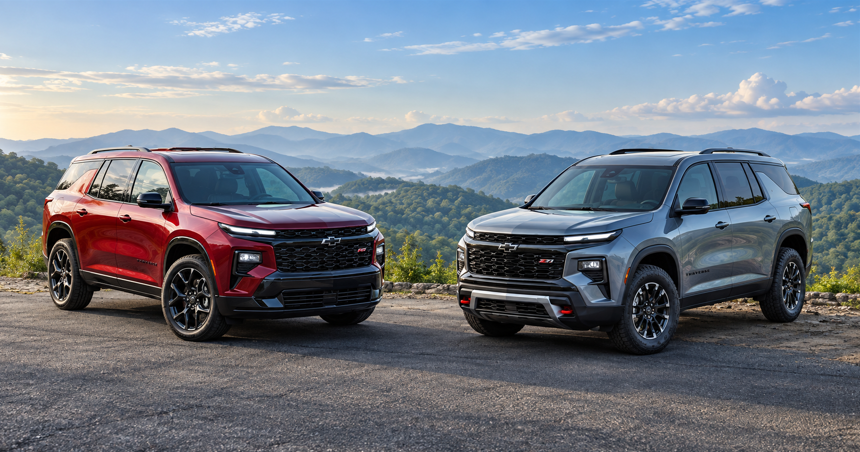
Picking between the 2027 Chevy Traverse RS and Z71 comes down to how you drive day to day, not what looks best in the driveway. Both trims share the same engine and seven passenger layout, but Chevrolet built them for different jobs: one leans into sporty tech and highway comfort, the other into all-weather traction and mild off-pavement capability. If you're weighing the 2027 Chevy Traverse RS vs Z71 for your own garage, we'll walk through the specs, pricing, and real-world use cases so you can decide with confidence. You can also browse our new Traverse inventory to see what's currently available at our Pasadena, Texas showroom. 2027 Chevy Traverse RS vs Z71 at a Glance Chevrolet builds both the 2027 Traverse RS and Z71 around the same 2.5L turbocharged four-cylinder engine, rated at 328 horsepower and 326 lb-ft of torque, paired with an 8-speed automatic transmission. Chevy Traverse 0 to 60 performance and everyday drivability stay consistent whether you pick the RS or the Z71. The real differences show up in drivetrain configuration, ride height, wheel design, and how each trim handles weather and terrain. AWD is optional on the RS (and on the LT), running $2,000 extra, while the Z71 comes with a twin-clutch AWD system as standard equipment built specifically for traction in changing conditions. Every 2027 Traverse, regardless of trim, carries a maximum tow rating of 5,000 lbs. Towing capability isn't a factor separating these two trims. Key Spec Comparison Table Spec Traverse RS Traverse Z71 Engine/Powertrain 2.5L turbo, 328 hp, 326 lb-ft 2.5L turbo, 328 hp, 326 lb-ft Drivetrain FWD standard, AWD optional ($2,000) Advanced Twin-Clutch AWD standard Ground Clearance/Off-Road Feature 6.8 inches 7.8 inches, Terrain Mode, Hill Descent Control, skid plate Wheels 22-inch high gloss black wheels 18-inch high gloss black machined-face wheels, all-terrain tires Starting Price $55,800 $49,100 Towing 5,000 lbs 5,000 lbs Design and Styling: Sporty RS vs Rugged Z71 The 2027 Traverse RS and Z71 wear their personalities on the outside. Chevrolet gives the RS a blacked-out, athletic look for drivers who want their SUV to feel sharp on city streets, while the Z71 goes taller and tougher, signaling it's ready for gravel roads and rougher weather. Exterior Differences Chevrolet equips the RS with blackout styling across the grille, roof rails, and badging, plus 22-inch high gloss black painted aluminum wheels for a cohesive blacked-out theme. It also includes rain sensing wipers, power folding and auto dimming mirrors, RS badging, and a flat bottom steering wheel that reinforces the sporty cabin feel. The Z71 rides on 18-inch high gloss black machined face wheels wrapped in all-terrain tires, with a full inch of extra ground clearance bringing it to 7.8 inches against the RS at 6.8. That added clearance, along with skid plate protection and an off-road tuned suspension, gives the Z71 a genuinely different silhouette from the RS. Interior Materials and Cabin Features Inside, the 2027 Z71 gains a new Oregon seat color, a natural tan finish that replaces the Torch Red accents the trim carried previously. The RS keeps its Jet Black interior with Red decor accents and stitching, and adds heated second row seats, power folding second and third row seating, ambient lighting, and a heated steering wheel. Both cabins feel upscale, but the RS clearly targets comfort-focused families while the Z71 leans toward a more casual, hard-wearing look. Performance and Capability Differences Engine and AWD System Comparison Since both trims share the same 2.5L turbocharged engine and 8-speed automatic, acceleration and daily drivability feel nearly identical between RS and Z71. Adding optional AWD to the RS shifts the feel slightly since that setup adds weight, but power delivery stays consistent. Where things diverge is drivetrain philosophy: Chevrolet reserves the Advanced Twin-Clutch AWD system exclusively for the Z71 as standard equipment, giving it a traction advantage in wet or loose conditions without requiring buyers to pay extra for it. Think of it less as one trim outmuscling the other and more as two different starting points for the same underlying hardware. Fuel economy shifts too: FWD models are EPA estimated at 20 city, 26 highway, and 22 combined MPG, while the AWD Z71 comes in at 20 city, 24 highway, and 21 combined. An AWD RS returns those same figures, so the gap is down to the drivetrain rather than the Z71's extra ride height. Z71 Off-Road Features and Terrain Modes Chevrolet builds the Z71 with Terrain Mode and Hill Descent Control, along with an off-road tuned suspension and skid plate protection underneath. These features make the Z71 well-suited for gravel driveways, muddy trailheads, or the kind of unpaved roads you'll find outside Pasadena on the way to weekend outings. The capability here is off-road-inspired and built for mild terrain rather than true rock crawling or technical trail work. Families dealing with Houston-area rain and flooding will likely appreciate the added traction more than hardcore trail use. If you want to feel this difference firsthand, contact our team to schedule a comparison test drive between the two trims. Technology and Safety Features Shared Across Trims Both the RS and Z71 come standard with a 17.7-inch touchscreen, an 11-inch digital driver display, wireless charging, wireless Apple CarPlay and Android Auto, and USB-C ports in all three rows, with Google built-in compatibility available. Chevrolet also adds a new interior camera for 2027, standard on the RS, for added peace of mind on long drives or when kids are in the back seats. On the safety side, every 2027 Traverse includes Chevy Safety Assist, a six-feature bundle covering Automatic Emergency Braking, Front Pedestrian Braking, Forward Collision Alert, Lane Keep Assist with Lane Departure Warning, IntelliBeam automatic high beams, and a Following Distance Indicator. Blind Zone Steering Assist, Rear Cross Traffic Braking, and a Safety Alert Seat come standard as well, part of the more than 20 standard safety and driver assistance features Chevrolet fits to every trim. Z71 buyers can add the Driver Confidence Package for HD Surround Vision, a Rear Camera Mirror, Rear Pedestrian Alert, and Traffic Sign Recognition, or the Enhanced Driving Package for Super Cruise and Driver Attention Assist. The RS includes that content as standard equipment. The biggest tech differentiator is Super Cruise itself. Chevrolet makes it standard on the RS for 2027, complete with a 3-year OnStar Super Cruise plan, while it remains an optional add-on for the Z71 and LT. For drivers who spend a lot of time on Houston freeway commuting, that hands-free highway assist is a meaningful RS advantage worth roughly the price of the package on its own. 2027 Traverse Price Comparison: RS vs Z71 The 2027 Chevy Traverse Z71 starts at $49,100 with its Advanced Twin-Clutch AWD included, while the RS starts at $55,800 with front-wheel drive and $57,800 with AWD. All of these are Chevrolet's published starting MSRPs and exclude destination charge, tax, title, license, and dealer fees. For reference, the entry-level LT starts at $40,800 on the same basis, and the High Country tops the four-trim lineup at $56,100. Because final pricing varies by configuration and current offers, we'd recommend checking our inventory or reaching out to get pre-approved for financing before you finalize a budget. Cargo Space, Seating, and Towing Capacity Both the RS and Z71 offer identical cargo and passenger figures, which makes this category less about choosing between them and more about confirming the Traverse fits your family's needs. The RS and Z71 each seat seven passengers, with second-row captain's chairs standard on both. Eight-passenger seating is available only on the LT, which offers an optional second-row bench seat. Cargo space checks in at 22.9 cubic feet behind the third row, expanding to 56.6 cubic feet with the third row folded, and a class-leading 98 cubic feet when both rear rows fold flat. Second row legroom measures 41.5 inches, with 32.1 inches in the third row, comfortable enough for adults on longer trips. Towing capacity holds steady at 5,000 lbs across every 2027 Traverse trim and drivetrain when properly equipped, which is worth knowing if you're planning to tow a boat out to Galveston Bay for a weekend on the water. Neither trim gains a towing edge here, so that decision comes down to styling, tech, and drivetrain preference instead. Which 2027 Traverse Trim Is Right for You? Choose the Z71 If You… You regularly drive on gravel, unpaved roads, or deal with heavy Houston-area rain and want that standard AWD traction without paying extra for it. A slightly more rugged, utilitarian interior that shrugs off mud, sand, and outdoor gear also matters more to you than a plush cabin. Choose the RS If You… Most of your miles come from highway commuting, and standard Super Cruise for hands-free stretches on long drives sounds appealing. A sportier blacked-out look and premium comfort touches like ventilated front seats matter more to you than the extra ground clearance the Z71 offers. Frequently Asked Questions About the 2027 Chevy Traverse RS vs Z71 Is the Chevrolet Traverse a good car overall? Chevrolet has positioned the Traverse as a family-focused three-row SUV with strong tech and safety features across trims, making it a solid option for buyers who want space and standard safety assistance features. Are Chevy Traverse models good cars for towing? Yes, every 2027 trim offers a 5,000 lb max tow rating when properly equipped, and the trailering package is included, which covers small boats, campers, and utility trailers for most Texas families. Does the Traverse RS require AWD? No, AWD is a $2,000 option on the RS, while FWD comes standard. What is the 2027 Traverse release date? The 2027 Traverse is on sale now. Chevrolet lists full pricing and specs for all four trims, and you can check our inventory to see what's on the ground in Pasadena. Visit Monument Chevrolet to Test Drive the 2027 Traverse See the Differences for Yourself Specs on a page only tell part of the story. Feeling the twin-clutch AWD grip on a wet road, or testing Super Cruise on the freeway, makes the difference between these trims much clearer. Ready to Compare the Traverse RS and Z71 in Person? Stop by Monument Chevrolet at 3940 Pasadena Freeway, Pasadena, TX 77503 to browse our new Traverse inventory, schedule a service appointment for your current vehicle, or get pre-approved for financing before you visit. As a family-owned dealership serving the Greater Houston area for over 50 years, we're glad to walk you through both trims with straightforward pricing and no pressure.

StabiliTrak on Chevy Silverado

How to Turn Off StabiliTrak on Chevy Silverado (All Model Years)

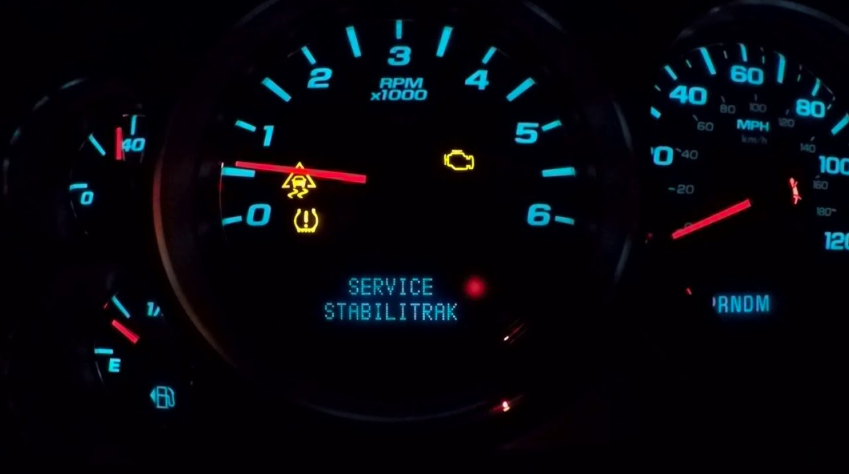
If you've ever felt your Silverado's engine power dip or the brakes pulse on their own while driving through mud or snow, that's StabiliTrak stepping in. Knowing how to turn off StabiliTrak on a Chevy Silverado, and when it actually makes sense to do so, matters for anyone who drives off-road, tows heavy loads, or just wants more control in specific situations. Our service team works on Silverados from every generation, and this guide breaks down the process for each one. What Is StabiliTrak on a Chevy Silverado? StabiliTrak is GM's trademarked electronic stability control system, a name that's been in use since 1996. On a Chevy Silverado, it works alongside the Anti-Lock Braking System (ABS) and Traction Control System (TCS) to keep the truck tracking where you're steering it. The system compares your intended path, based on steering angle, to the truck's actual path. When those two things don't match, it applies braking force to individual wheels to pull the truck back in line. It relies on wheel speed sensors and a steering angle sensor, plus a yaw sensor that picks up on side-to-side rotation. The system can reduce engine power temporarily to help regain traction, though it doesn't limit power during normal driving. Cruise control will also disengage automatically if TCS or StabiliTrak activates, worth knowing if you're on the highway and hit a slick patch. Is It Safe to Turn Off StabiliTrak? Whether it's safe to disable StabiliTrak depends entirely on the driving conditions you're facing. The system helps in situations where your Silverado's actual movement doesn't match your steering input, which covers most of the time you're behind the wheel. But there are specific scenarios where the wheel spin StabiliTrak tries to prevent is actually useful to you. When Turning It Off Helps (Snow, Mud, Sand, Off-Road) If you're stuck in deep snow, mud, or sand, StabiliTrak and TCS can work against you by cutting power to spinning wheels when what you need is momentum to rock free. Off-road drivers often turn off traction control and StabiliTrak together to allow more wheel slip, which helps with climbing loose or uneven terrain. Both systems auto-disable in 4WD Low (4LO), since that mode assumes you need maximum wheel articulation. When You Should Leave It On Outside those low-traction, off-road scenarios, StabiliTrak should stay active. This holds especially true around Pasadena, Texas, where sudden downpours and slick highways are part of everyday driving. StabiliTrak's ability to correct skids during sudden lane changes or wet-road maneuvers is exactly the kind of protection you want on a rain-soaked freeway. How to Turn Off StabiliTrak by Model Year The steps for how to turn off StabiliTrak on a Chevy Silverado have changed across generations, and terminology varies by trim and model year. The table below breaks down what to expect on each platform. Model Years Button/Menu Location Dash Indicator Reset Method Notes 1999–2006 (GMT800) Varies by trim; often tied to 4WD controls Varies by trim Consult owner's manual No universal button across all trims 2007–2013 (GMT900) TCS/StabiliTrak button on dash "StabiliTrak Off" and "Traction Control Off" Press and hold button 5 seconds Hold time can vary slightly by truck 2014–2018 (K2XX) TCS/StabiliTrak button on dash Single press: TCS Off; hold ~5 sec: both off Press and release, or press and hold Auto-disables in 4LO 2019–2026 (T1XX) TCS/StabiliTrak button on dash Single press: TCS Off; hold ~5 sec: both off Press and hold until lights stay on Auto-disables in 4LO 1999–2006 Silverado (Early StabiliTrak Systems) Most GMT800-generation Silverados didn't have StabiliTrak at all. Electronic stability control arrived on GM trucks gradually and didn't become standard equipment until the federal phase-in later that decade, so what you'll find on a truck from these years is traction control, often with no dedicated stability control button anywhere on the dash. If your GMT800 truck does have a stability or traction control switch, placement varies by trim and model year. The owner's manual in your glovebox is the reliable answer here, or bring it by and our technicians will tell you in a minute what your specific truck has. 2007–2013 Silverado (GMT900 Generation) This generation introduced a more standardized approach. Press and hold the TCS/StabiliTrak button for about five seconds until both the "Traction Control Off" and "StabiliTrak Off" indicators appear on the dash. That's the procedure GM's owner's manuals describe, though the exact hold can feel a touch different from truck to truck. You might come across suggestions to pull the ABS fuse as a workaround for disabling these systems. We wouldn't recommend that route. Pulling the ABS fuse disables your Anti-Lock Braking System entirely, not just StabiliTrak, and that's a significant safety tradeoff for a shortcut that isn't part of any factory procedure. 2014–2018 Silverado (K2XX Platform) On K2XX-platform Silverados, the button behavior became more refined. A single press and release of the TCS/StabiliTrak button disables traction control only, which shows up as "Traction Control Off" on the dash or Driver Information Center (DIC). Pressing and holding the button for about 5 seconds disables both TCS and StabiliTrak together, confirmed by both indicators lighting up. 2019–2026 Silverado (T1XX Platform) The T1XX platform carries forward the same button logic. Press and release to disable traction control alone. Press and hold until both the Traction Control Off and StabiliTrak Off indicators illuminate to disable both. Press and release again to restore both systems. Both turn back on automatically every time you start the truck. Before going further with any permanent disabling of these systems, it's worth understanding the regulatory side. Permanently disabling StabiliTrak may violate Federal Motor Vehicle Safety Standard FMVSS 126, which requires electronic stability control on vehicles manufactured on or after September 1, 2011 (with full phase-in for altered or multi-stage vehicles by September 1, 2012). Beyond the compliance angle, a permanently disabled system could complicate matters after an accident or during vehicle inspections, so it's worth discussing with a professional. This is general factual information, not legal advice, so if you're considering a permanent modification, it's worth talking to a professional first. If you have questions about your specific truck, reach out to our team and we can point you in the right direction. StabiliTrak Off vs. Traction Control Off: Knowing the Difference A lot of confusion around this topic comes down to not knowing these are two related but distinct systems. TCS focuses on wheel spin: it brakes a spinning wheel or reduces engine power when you're accelerating and one wheel loses grip, common on icy inclines or loose gravel. StabiliTrak, on the other hand, focuses on overall vehicle direction, applying braking to individual wheels when your Silverado's actual path diverges from where you're steering, typically during skids or sharp evasive maneuvers. A single button press turns off TCS only. Holding that same button turns off both TCS and StabiliTrak together, which is why you'll sometimes see both indicators displayed on the dash at once. Knowing this distinction helps you pick the right level of intervention for whatever driving situation you're in. What Triggers the 'Service StabiliTrak' Warning Light A Service StabiliTrak warning doesn't necessarily mean something's seriously wrong. It means the system found an issue it can't safely work around, and these issues usually trace back to a handful of common culprits. Common Sensor and Module Issues Engine misfires are a frequent trigger, particularly in 2009–2013 trucks equipped with Active Fuel Management/Displacement on Demand (AFM/DoD), which are known to develop lifter failures that cause misfires. Dirty or failing wheel speed sensors can send inaccurate data to the system, as can a misaligned or defective steering angle sensor. Low battery or alternator voltage can disrupt the electrical signals these systems depend on, and an ABS module failure will often trigger both the ABS light and the StabiliTrak warning together. Low brake fluid is another straightforward cause worth checking first. One scenario we see often: the light comes on after a battery disconnect or a wheel alignment, usually because the steering angle sensor wasn't recalibrated afterward. You can generally drive with a StabiliTrak light on for short distances, but the system may be partially or fully disabled while the light is up. Whether it's safe to keep driving depends on what triggered it. If it's paired with an ABS light or the truck feels unstable, get it looked at before continuing to drive. How to Reset the Service StabiliTrak Light There are two at-home steps worth trying before heading to a shop. First, disconnect both battery cables for 10 to 15 minutes; this can sometimes clear temporary glitches, though it won't fix underlying mechanical failures. Second, try a steering wheel reset: turn the wheel all the way to the left, then all the way to the right, then restart the engine. This handles steering angle sensor confusion in many minor cases, even without a code reader. If the light returns after trying these at-home methods, an OBD-II diagnostic scan is the next step, and that's best left to a certified technician. Our factory-trained technicians at Monument Chevrolet can run that scan and, if needed, recalibrate the steering angle sensor. Turning StabiliTrak Back On Turning StabiliTrak back on is simple: press and release the same button you used to disable it. The dash indicators for "Traction Control Off" and "StabiliTrak Off" clear once the systems are back online, confirming both are active again. FAQ Is it illegal to turn off StabiliTrak? Temporarily disabling StabiliTrak for specific driving conditions isn't illegal, but permanently disabling it may violate FMVSS 126 for vehicles manufactured on or after September 1, 2011, with full phase-in for altered or multi-stage vehicles by September 1, 2012, and it could complicate insurance claims or state inspections. Will StabiliTrak turn back on by itself? StabiliTrak doesn't re-engage on its own while you're driving, though both systems turn back on automatically every time you restart the truck. Some model years may also restore stability control above a certain speed, so check your owner's manual. It also auto-disables whenever you shift into 4LO. Visit Monument Chevrolet for Sales and Service in Pasadena Monument Chevrolet has served Pasadena, Texas for more than 65 years, originally as Timmers Chevrolet, and we remain the only family-owned Chevrolet dealership in the Greater Houston area. Our factory-trained technicians have worked on Silverados across every generation covered in this guide, including early GMT800 trucks and current T1XX-platform models. Schedule Service or Explore a New Silverado If your Silverado's Service StabiliTrak light won't clear, or you'd rather have a professional confirm what's triggering it, schedule a service appointment with our team. And if your current truck has you thinking about an upgrade, you can also browse our new Silverado 1500 inventory at our Pasadena location on Pasadena Fwy.